
Remind: School Communication
Remind101Education
4.371.80K Reviews
- Version
- 15.8.3
- Installs
- 10.00M
- Age Rating
- Everyone
Screenshots
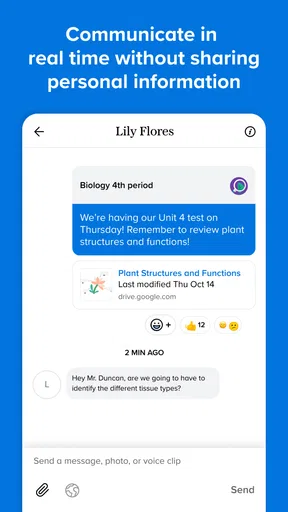
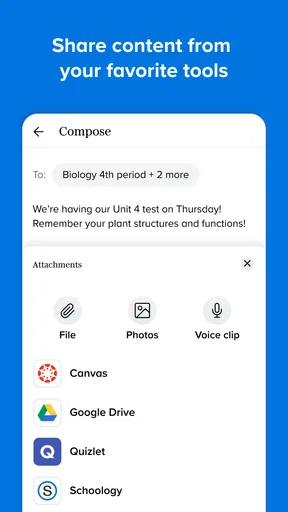
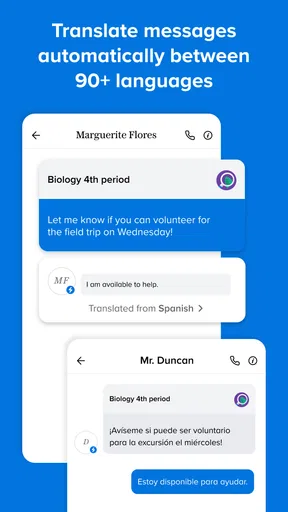
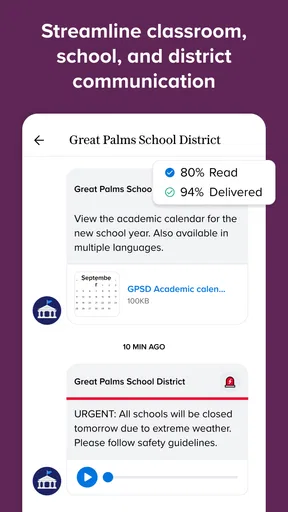
Our Review of Remind: School Communication
 Analysis by Appyee
When school communication is scattered across paper notes, email threads, and last-minute messages, even a simple reminder can become surprisingly difficult to manage. I found Remind useful because it focuses on one clear job: helping teachers, students, and families stay connected around school-related communication. It is a free education app from Remind101, and after using it, I see its main value less as a full learning platform and more as a practical communication layer.
The app is available for everyone, which makes sense for a tool that may be used by teachers, parents, and students with very different levels of technical confidence. Its broad adoption also suggests that the idea is easy to understand: the app has passed 10 million installs, with a 4.3 average from around 227 thousand ratings. Those figures do not tell me whether every school will use it perfectly, but they do reflect a product that has become familiar to many people.
Following a school message from the first alert to the final outcome
I find it useful to follow a school message as a chain of small decisions: whether the alert is noticed, whether the instruction is clear, and whether someone completes the requested action. In this section, I’ll focus on how those handoffs can succeed or stall in everyday use, including the practical habits that help a message become a result rather than just another notification.
Starting with the communication problem
The most realistic way to judge Remind is to begin with an ordinary school day. Imagine a teacher needs to tell families about a changed assignment, an upcoming activity, or a schedule adjustment. The information has to reach the right people, and those people need a reasonable chance of noticing it before the issue becomes urgent.
In that situation, Remind is more focused than a general social network or a normal email inbox. The communication is tied to a school context rather than mixed with personal conversations, advertising, newsletters, and unrelated notifications. I appreciate that distinction because school messages are easy to lose when they arrive alongside everything else in a family’s digital life.
The app’s store summary is “School Communication,” and that description is simple but accurate. I would not install it expecting a complete replacement for a learning management system. It is better understood as a place where school-related updates can be delivered and followed, especially when the goal is to keep a group informed rather than build a full online course.
Setting up the right audience
The first important step is not typing a message; it is making sure the communication reaches the correct group. A teacher may need to contact one class, several classes, or families connected to a particular activity. A parent or student, meanwhile, needs to join the appropriate communication channel rather than assume that every school message will appear automatically.
This is where the quality of the school’s setup matters. Remind can make communication more organized, but it cannot correct a wrong class connection, an outdated contact detail, or a family member who has not joined the intended group. My practical advice is to treat the first setup as a verification step: check the class or group name, confirm that the intended recipient is connected, and avoid assuming that one person’s enrollment automatically covers everyone in a household.
That small habit prevents a common failure. A message can be written perfectly and sent at the right time, yet still fail if it is attached to the wrong audience. In my experience, communication tools are often judged by their notifications, while the more important issue is whether the message begins in the correct place.
Writing a message people will actually use
Remind works best when the sender treats each message as an action prompt rather than a miniature announcement board. I would put the essential detail first: what changed, who needs to respond, and by when. If a student or parent has to read several lines before discovering the actual task, the convenience of receiving the message is partly lost.
A useful workflow is to send one clear update when the information is ready, then use a later message only when there is a genuine change or a necessary reminder. Sending every minor thought can create notification fatigue. Families may mute or ignore a channel if the stream becomes noisy, even when the app itself is working as intended.
This is one of the less obvious trade-offs with a dedicated communication app. It makes sending school messages easier, but that ease can encourage overuse. I think Remind is strongest when the sender has a simple communication policy: urgent changes are clearly marked in the wording, routine information is grouped sensibly, and repeated reminders add something new instead of copying the original message.
Moving from sender to recipient
The handoff between teacher and family is the heart of the experience. A teacher creates the message, the connected audience receives it, and the recipient decides whether to read, act, or reply. That chain sounds straightforward, but each step can introduce friction.
For a parent, the benefit is having school information in a dedicated place instead of relying on a child to remember every detail. For a student, the app can make a teacher’s reminder easier to revisit than a verbal announcement made during a busy class. For a teacher, it creates a direct route to the people who need the update.
Still, I would not treat a delivered message as proof that the outcome is complete. A family may see the notification and forget to act. A student may read the message but misunderstand the instruction. A teacher may assume that silence means agreement. Remind supports the communication step; the people using it still need to close the loop.
Using replies without turning the channel into confusion
Replies can be valuable when a recipient needs clarification, but they also change the nature of the channel. A short question about an assignment can save a separate phone call or email. On the other hand, a long personal conversation may be better handled through the school’s established private process rather than in a group communication stream.
I recommend keeping replies tied to the original subject. If a family needs to discuss a sensitive issue, the initial response should simply identify the issue and move the conversation to the appropriate school contact route. This is not a weakness unique to Remind; it is a reminder that a communication app cannot replace judgment about what belongs in a shared channel.
For teachers, the practical advantage is speed, but speed should not become an expectation of instant availability. Families may assume that a message sent through an app deserves an immediate response, while teachers may use the app only during certain parts of the day. Agreeing on realistic response habits can prevent the tool from creating pressure that it was never meant to solve.
Where the handoffs are strongest
Remind is particularly helpful when several people need the same information at roughly the same time. A teacher can communicate an update once rather than repeating it separately to each family. A parent can refer back to the message instead of depending on a student’s memory. A student can see the same basic instruction that the family received, reducing the chance that two people are working from different versions of the story.
That shared reference point is more useful than it may sound. In a busy household, one parent may be at work while another is handling school pickup. If both are connected to the relevant communication, the responsibility for remembering a change does not rest entirely on one person. The app becomes a small but meaningful handoff between school and home.
It is also useful for recurring routines. A teacher might communicate a change in preparation requirements, while a family uses that message to organize the evening. The outcome is not dramatic technology; it is fewer avoidable misunderstandings. I value that kind of quiet improvement more than flashy features.
Where the handoffs become weaker
The system is less effective when a school uses several communication tools at once without explaining which one is authoritative. If assignments live in one platform, grades in another, and announcements in Remind, families may still feel overwhelmed even though each individual tool is reasonable.
This is the main situation in which I would hesitate to recommend it as a universal solution. Remind can simplify a school’s communication, but it cannot create consistency between separate systems. Before adopting it, a school should decide what belongs there and what should remain elsewhere. Otherwise, the app may add another inbox rather than remove confusion.
There is also a human limitation: not every recipient checks notifications with the same regularity. A parent who rarely opens the app may miss a time-sensitive update. A student may have notification settings that reduce visibility. For important changes, I think the school should use a communication routine that does not rely on one tap or one alert alone.
A realistic everyday scenario
Consider a teacher who discovers that students need different materials for the following day. The teacher sends a concise update to the appropriate class communication group, placing the required action near the beginning. A parent sees the message while planning the evening, checks the details with the student, and prepares the materials. If the student is unsure about one item, the family can ask for clarification instead of waiting until the next class.
The outcome is modest but concrete: the student arrives better prepared, the teacher spends less time repeating the same instruction, and the family has a record of what was communicated. The workflow succeeds because the message has a clear audience, a clear action, and enough time for the handoff from school to home.
Now change one part of the scenario. Suppose the family is connected to an old class group, or the teacher sends the message to a broad audience where it is easy to overlook. The same app is present, but the workflow breaks at the audience stage. That is why I see setup discipline and message clarity as just as important as the app’s interface.
Comparing it with email, texts, and full school platforms
Compared with ordinary email, Remind feels more purpose-built for school communication. Email is flexible and familiar, but it can become cluttered, especially when messages from several teachers, school offices, and unrelated services arrive in one inbox. Remind’s value is the narrower context and the connection between a school group and its recipients.
Compared with personal text messaging, the app offers a more suitable boundary for school-related contact. Text messages can feel immediate, but they can also blur personal and professional communication. A dedicated school channel gives the conversation a clearer purpose and makes it easier for a school to communicate with a group rather than manage many separate threads.
Compared with a full learning management system, Remind is lighter. A learning platform is usually the better choice when the main need is structured coursework, submissions, grading, and long-term academic organization. Remind is the better fit when the main problem is getting a timely message to the right people without asking everyone to navigate a large academic system.
That distinction helped me decide who should use it. I would recommend it to schools, teachers, and families that need a focused communication route. I would not choose it alone for managing an entire curriculum, tracking every assignment, or replacing all school administration tools.
Practical habits that improve the experience
The first habit I would suggest is creating a simple naming and organization routine for classes or groups. When several channels look similar, recipients can make mistakes. Clear group identification reduces the chance of reading a message as if it applied to everyone when it was meant for a smaller audience.
The second is to write messages for the person reading them on a phone. Put the action first, avoid burying the deadline in a long explanation, and separate background information from the immediate instruction. This is especially important when a parent is checking the app quickly between other responsibilities.
The third is to use the app as a record of decisions, not as a running diary. If a plan changes, explain the change plainly. If a previous message is no longer relevant, make that clear in the update. This reduces the mental work required to compare several messages and guess which one is current.
A fourth useful practice is to agree on an escalation path. If a message involves a personal concern, a health matter, or a complicated family situation, the app should be the starting point for identifying the issue, not necessarily the place to resolve every detail. Knowing when to move from a group message to a more appropriate conversation protects both clarity and privacy.
What the app feels like in daily use
My overall impression is that Remind succeeds through restraint. It is not trying to turn school communication into entertainment, and that is a strength. The purpose is easy to understand, and the experience makes the most sense when the school has already decided how it wants to communicate.
The friction comes from expectations. Some people may assume that installing the app automatically solves missed messages, while others may expect it to contain every school resource. It does neither by itself. The app is a channel, and the quality of the result depends on the accuracy of the group connections, the discipline of the sender, and the attention of the recipient.
There is also a social adjustment. Teachers may need to become comfortable communicating in a concise written style, while families may need to learn which notifications deserve action and which are routine. That learning curve is not severe, but it is real. A school that introduces the app without explaining its role may create uncertainty instead of reducing it.
Compatibility, cost, and who should skip it
Remind is free, carries an Everyone age rating, and its current version is 15.6.4. It supports devices running iOS 9 or later, which makes it accessible to people who may not have the newest phone. The app was released on October 5, 2012, so it is not a brand-new experiment; it has had time to become an established name in school communication.
I would skip it if I were looking for a private family messenger, a complete virtual classroom, or a single system for grades, files, lessons, and submissions. I would also be cautious if a school already has a well-organized communication platform and adding another app would force families to monitor one more place.
For a teacher working with several groups, a parent who wants a clearer school contact route, or a student who needs reminders outside the classroom, the fit is much better. The strongest case is a school that wants to reduce dependence on paper notes and scattered messages while keeping the communication focused.
My final take on the communication workflow
After looking at the full path from the first message to the final action, I see Remind as a useful specialist rather than an all-purpose school platform. It can make the handoff between teacher, student, and family more visible, especially when everyone knows which group to use and what kind of information belongs there.
Its biggest strength is practical: one school update can become a shared reference instead of a chain of repeated explanations. Its biggest weakness is equally practical: the app cannot fix unclear ownership, poor group setup, excessive notifications, or a school that spreads information across too many competing channels.
Remind101 has built an education app that is easy to recommend when the need is focused school communication. I would use it when the desired outcome is a timely, understandable connection between school and home. I would pair it with, rather than substitute it for, a fuller academic system when coursework and records are involved. My recommendation is simple: choose it for the communication handoff, then define the rest of the school workflow around it.
Privacy and Permissions
See what permissions an app requests and how it handles your data.
- Identity
- find accounts on the device, read your own contact card
- Contacts
- find accounts on the device, read your contacts
- Phone
- directly call phone numbers, read phone status and identity
- Photos/Media/Files
- read the contents of your USB storage, modify or delete the contents of your USB storage
- Storage
- read the contents of your USB storage, modify or delete the contents of your USB storage
- Camera
- take pictures and videos
- Microphone
- record audio
- Device ID & call information
- read phone status and identity
- Other
- view network connections, pair with Bluetooth devices, full network access, change your audio settings, run at startup, use accounts on the device, control vibration, prevent device from sleeping
Verdict
Strengths of Remind: School Communication
- Simple messaging keeps teachers, students, and families connected.
- Supports class announcements, reminders, and event updates in one place.
- Translation tools help multilingual families follow school communication.
- Users can mute notifications or adjust delivery preferences.
- Available on both Android and iOS for convenient access.
Limitations of Remind: School Communication
- Some schools may restrict features based on their Remind subscription plan.
- Frequent classroom alerts can become overwhelming without careful settings.
- Account access depends on receiving an invitation or class code.
- Message history may be difficult to search in busy class conversations.
- Not every school or teacher uses Remind, limiting its usefulness.
Similar Picks in This Category
View All
Duolingo: Language Lessons
Duolingo4.7

Google Classroom
Google LLC2.8

Unacademy: Learn & Crack Exams
Unacademy3.2

Bible App for Kids
Life.Church4.4

Cake - Learn English & Korean
Cake Corp.4.7

Brainly: AI Homework Helper
Brainly4.5
Frequently Asked Questions
What is Remind: School Communication used for?
Remind is a communication platform designed to connect teachers, students, parents, and school staff in one place. After testing its main features, we found that it is primarily useful for sending class announcements, homework reminders, schedule updates, private messages, and urgent notifications. It helps reduce reliance on paper notices, email chains, and separate messaging services for everyday school communication.
Do I need a class code or invitation to use Remind?
In most cases, yes. To participate in a class or school group, you generally need an invitation, class code, phone number, or another joining method provided by a teacher or administrator. Students and parents cannot always access every feature immediately after installing the app. Your available groups and permissions depend on how your school has configured Remind and whether staff members have invited you.
Can parents and students use Remind on the same account?
Remind supports different user roles, so parents, students, teachers, and school staff may have different options and views. A parent can usually join classes to receive updates about a child, while a student can participate directly when permitted by the school. It is best to use the correct account type and follow the school’s instructions, especially when managing more than one child or class.
Does Remind support private messages and group announcements?
Yes, Remind is built for both group communication and selected private conversations. Teachers can send announcements to an entire class, a subgroup, or individual recipients, depending on their permissions and school settings. Messages may include text, attachments, links, or other educational information. However, communication features can vary by account type, institution, and any restrictions established by the school.
Is Remind: School Communication free to download and use?
The Remind app is generally free for families and students to download and use for standard school communication. However, some schools or organizations may use additional administrative services or paid plans with expanded management features. Availability can also differ by region and institution. Before downloading, check the current Google Play Store or App Store listing and confirm whether your school requires a specific invitation or setup process.
